Accounts Receivable Overview
Accounts Receivable allows your firm to track the sale and payment of project services provided to your clients. Accounts Receivables can also record sundry sales to clients and employees. Accounts Receivable also manages and analyzes the value of work done but not yet billed, commonly known as Work in Progress (WIP).
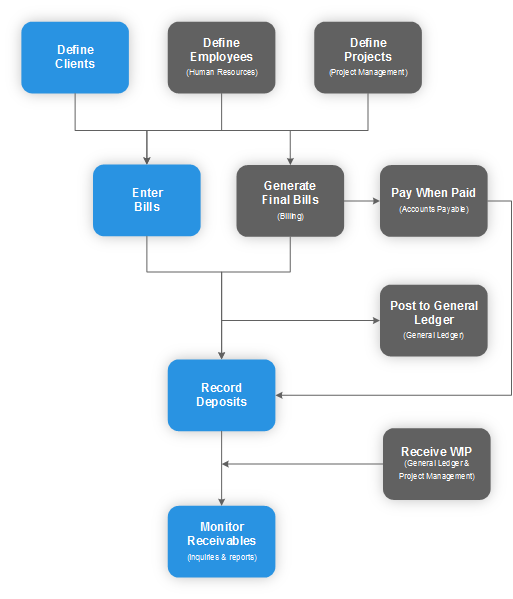
To begin, set up a client or employee with their payment terms and payment address. Enter bills to record the debt owed by the client or employee. The bills for project services are usually automatically generated through the billing process. Use the Deposit document to record payments made by clients or employees against their outstanding debt.
Features
The Accounts Receivable documents allow you to:
- Define clients and payment terms. See Define Clients.
- Define employees in the Human Resources module. See Define Employees.
- Manually enter or automatically generate bills. See Enter Bills.
- Record payments. See Record Deposit.
- Receive the Work in Progress values. See Revenue Journal Entry Criteria (General Ledger).
- Monitor outstanding funds due to the firm. See Monitor Receivables.
Accounts Receivable Flowchart
The flowchart provides an overview of the basic accounts receivable process.